
EZ Sticker Maker for WhatsApp1.0.0 - Google Play
You'll be able to see results in few seconds.
Publisher Description
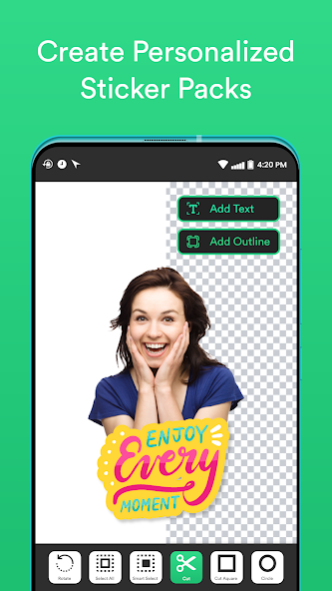


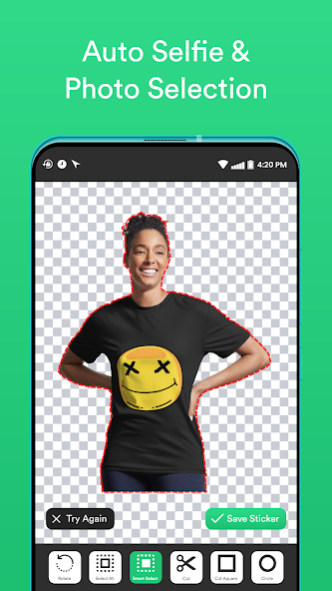
Finding sticker maker app for free? Do you want to turn your photos into comedy-style whatsapp stickers rapidly and easily? Want to show how unique and cool your whatsapp stickers can look? So, get ready because this whatsapp sticker maker is for you!
It is such a fun and cool whtsapp sticker maker app. Download this “EZ Sticker Maker for Whatsapp: Animated Sticker” to generate whatsapp stickers now.
How to make sticker pack for whatsapp?
• It only has 3 steps to make a sticker pack.
• Choose a picture and cut the background from the photo
• Add text stickers or decorations to make your stickers look more attractive and Save.
• Click export to add your sticker pack or text sticker to whatsapp.
• You are done. Now chat with your friends using your own whatsapp sticker pack.
What’s the main Features?
• This is a free Sticker Maker and free Sticker pack app for whatsapp.
• “EZ Sticker Maker for Whatsapp: Animated Sticker” is a free sticker creator application. It is easy to make stickers and the interface is friendly. Especially, a cute sticker making IP.
• Within 3 simple steps, you can make stickers that can be used in whatsapp.
• As a whatsapp stickers making app, it is totally suitable for compatible and even compatible Businesses.
✂️
Fast image crop and free whatsapp stickers photo cropping app
This sticker maker app provides many ways to cut your pictures during the sticker maker process. It has squares, select all, free-hand image cropping.
🌀
Strong rich text sticker maker
• This app has a strong text sticker editor. It provides multiple special functions which makes whatsapp stickers more attractive.
• Stickers colors, text stickers’ special effects, such as text sticker curve, sticker text shadows, text sticker templates, etc.
• Sticker Maker gives numbers of popular text sticker’s fonts selection.
🤩
Provide emoji and other decorations for making stickers attractive
This sticker maker app provides different kinds of sticker emoji and whatsapp stickers making decorations. When you make whatsapp stickers, you can add some sticker decorations to make funnier and more outstanding whatsapp stickers.
There are many types of options for you to choose from when making stickers for whatsapp. Try now how cool and fun your personalized whatsapp stickers will look?
🌝
One sticker pack contains multiple stickers
According to the demands of whatsapp sticker pack, normally a customized sticker pack for whatsapp stickers needs to add 3 stickers at least and up to 30 personalized stickers.
According to the display requirements of customized whatsapp stickers, the best display effect of sticker making is 1:1 square. So, we provide a 1:1 sticker creation ratio by default.
Adding edges to your customized stickers to make your stickers for whatsapp more wonderful. When making whatsapp stickers, you can turn on the border of the customized sticker to make sticker for whatsapp more visible.
Support exporting customized stickers to multiple whatsapp. After making stickers, you can click the Export button at the bottom of the personalized sticker pack details page to export the finished sticker. Imagine their stunned expression after seeing a whatsapp sticker made with their own photos.
🔄
Share your created stickers pack
You can share customized stickers pack you have made to your anyone. Let more people see the stickers made by you, use these stickers.
✔️
Notes
- Sticker Maker is a tool to create stickers.
- The stickers are created and used by real-time users, the sticker maker app will not use or control them. Users will be liable for the stickers they made.
About EZ Sticker Maker for WhatsApp
The company that develops EZ Sticker Maker for WhatsApp is Auto Xtreme. The latest version released by its developer is 1.0.0.
To install EZ Sticker Maker for WhatsApp on your Android device, just click the green Continue To App button above to start the installation process. The app is listed on our website since 2022-10-06 and was downloaded 0 times. We have already checked if the download link is safe, however for your own protection we recommend that you scan the downloaded app with your antivirus. Your antivirus may detect the EZ Sticker Maker for WhatsApp as malware if the download link to com.las.ez.sticker.maker is broken.
How to install EZ Sticker Maker for WhatsApp on your Android device:
- Click on the Continue To App button on our website. This will redirect you to Google Play.
- Once the EZ Sticker Maker for WhatsApp is shown in the Google Play listing of your Android device, you can start its download and installation. Tap on the Install button located below the search bar and to the right of the app icon.
- A pop-up window with the permissions required by EZ Sticker Maker for WhatsApp will be shown. Click on Accept to continue the process.
- EZ Sticker Maker for WhatsApp will be downloaded onto your device, displaying a progress. Once the download completes, the installation will start and you'll get a notification after the installation is finished.
Program Details
System requirements
Download information
Pricing
Version History
version 1.0.0
posted on 2022-10-06
Disclaimer
Official Google Play Link
We do not host EZ Sticker Maker for WhatsApp on our servers. We did not scan it for viruses, adware, spyware or other type of malware. This app is hosted by Google and passed their terms and conditions to be listed there. We recommend caution when installing it.
The Google Play link for EZ Sticker Maker for WhatsApp is provided to you by apps112.com without any warranties, representations or guarantees of any kind, so access it at your own risk.
If you have questions regarding this particular app contact the publisher directly. For questions about the functionalities of apps112.com contact us.
